How to read
ES1Levels
Bulls hunting FBDs. We never chase. We sit on our hands and wait for the flush, then the recovery.
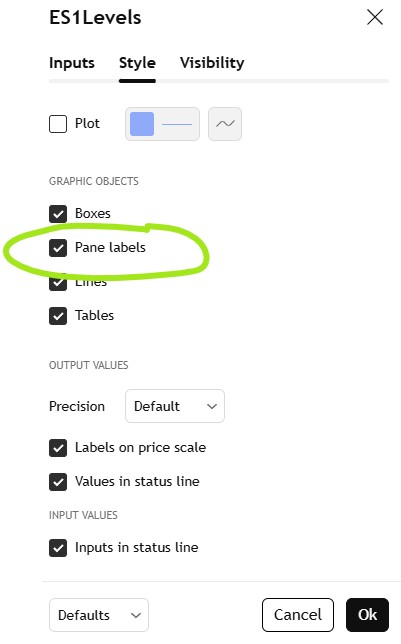
Pane labels
The most important feature. Every major level carries the exact action from the newsletter — hover it and the full plan appears. Make sure this is enabled in the Style tab.
If labels are not showing on your chart, this is the first thing to check. One tick and every level becomes a full briefing note.
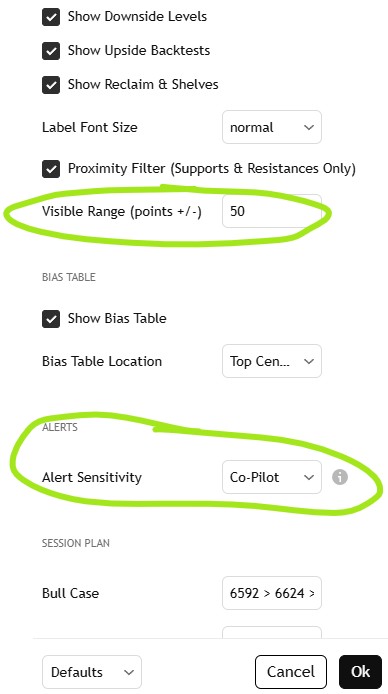
Visible range
Controls how many levels appear around current price. Adjust it to match your session — tighter for focus, wider for planning ahead.
Default is 80 points. The key overlay lines — yellow pivot, green reclaim, lime shelf, amber trigger, purple best entry — are always visible regardless of this setting.
The bias table — top of chart
Two rows. Fixed for the entire session. This is the newsletter plan at a glance — it does not react to price. Move it or hide it in the settings if it gets in the way.
The bottom banner — your action engine
This is the live signal. Four states, one clear instruction each time it changes. Set one TradingView alert — "Any Alert() function call" — and it notifies you every time the banner changes state.
The golden rules
These apply every session, regardless of what the levels say.
Color reference
Every line color has one job. Quick reference only — the pane labels carry the full detail.